How to Automate Daily Construction Reports (Without Losing What Actually Matters)
AI can now generate a 90%-complete daily report before you even sit down to write one. The question isn't whether to automate your daily logs—it's how to do it without losing the context that actually matters when disputes show up six months later.
Alena Tuttle

AI can now generate a 90%-complete daily report before you even sit down to write one. The question isn't whether to automate your daily logs—it's how to do it without losing the context that actually matters when disputes show up six months later.
If you're a superintendent or head of field ops in commercial construction, you already know how the end of every day goes. The crews leave. The site goes quiet. And then you sit down—exhausted—to document everything that happened over the last 10 hours. From memory.
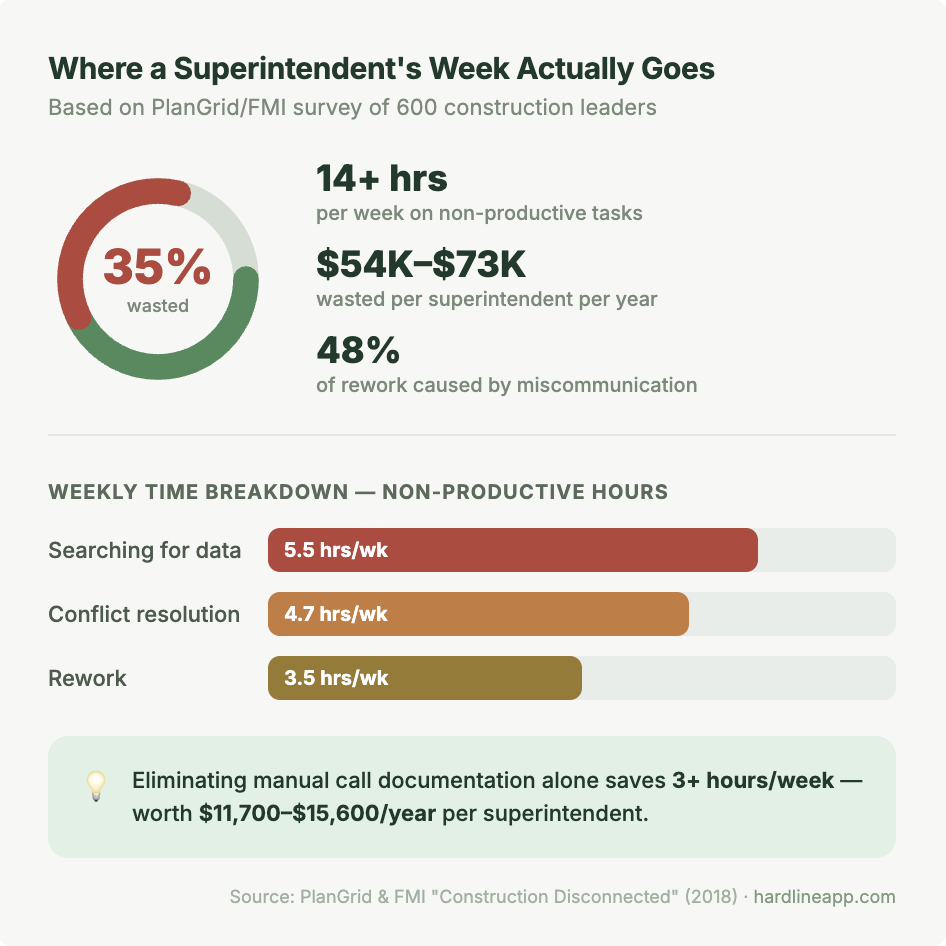
According to PlanGrid and FMI, construction professionals spend 35% of their time—over 14 hours per week—on non-productive activities. A huge chunk of that is documentation. Writing up calls, logging progress, reconstructing conversations that happened six hours ago. It's the single biggest time sink on most commercial jobsites, and in 2026, AI is finally good enough to fix it.
But here's the thing most people get wrong about automating daily reports: the report itself was never the point. The point is the record. The decisions. The verbal approvals that nobody wrote down. Get the automation wrong and you end up with a prettier version of the same problem—incomplete documentation that falls apart the moment someone says "that's not what we agreed to."
Why Most "Automated" Reports Still Fall Short
There's no shortage of daily report apps. Most of them digitize the process—swap the clipboard for a tablet, add some dropdown menus, let you attach photos. That's not automation. That's data entry with a touchscreen.
Real automation means the information gets captured during the work, not after it. And the hardest information to capture isn't what concrete was poured or which crews were on site. It's the phone calls. The verbal decisions. The on-the-fly approvals that happen 20 times a day between the super, the PM, the subs, and the owner's rep.
That's the black hole. Every superintendent's phone is a repository of critical project decisions that exist nowhere else—not in the PM system, not in the daily log, not in any searchable format. And that's exactly where AI needs to be working.
What AI-Powered Daily Reports Actually Look Like in 2026
The first wave of AI in construction was chatbots and form-fillers. The second wave—what's happening right now—is AI that listens, synthesizes, and documents in real time. Here's the difference:
Old way: You make 25 calls during the day. At 4:30 PM, you try to remember what was discussed on each one. You type up a summary. You miss half the details. You submit it and hope nobody asks questions.
New way: AI captures the conversation as it happens—transcribes it, pulls out the decisions and action items, timestamps everything, and drafts a report you can review in two minutes. By the time you hang up with the electrical sub, it's already logged.
That's not a fantasy. That's what tools built specifically for field ops are doing right now. The AI doesn't replace your judgment—it replaces the 90 minutes of typing you do after a 10-hour day.
The 5 Things Your Automated Daily Report Should Capture
Not all daily report automation is created equal. If you're evaluating tools—or trying to decide if AI is ready for your jobsite—here's what to look for:
1. Phone Call Documentation
This is the big one. If the tool doesn't capture what's said on your calls, it's missing 60-70% of the decisions made on a commercial jobsite. Voice-to-text transcription with AI summarization is the baseline now.
2. Decisions and Verbal Approvals
"Go ahead and use the alternate fixture" is a decision. It needs to be timestamped, attributed, and searchable. Not buried in someone's memory.
3. Task Extraction
When the PM says "send me the updated schedule by Thursday," that's a task. AI should pull it out automatically—not wait for you to manually enter it into a tracker.
4. Sync with Your PM Tools
The daily report isn't the final destination. It needs to flow into Procore, ACC, Fieldwire, or whatever your team uses. If it doesn't, you're just creating another silo.
5. A Searchable Archive
Six months from now, when someone disputes a change order, you need to pull up exactly what was said and when. Text search across transcripts is infinitely better than "I think it was a Tuesday in October."
What This Means for Your Role
Let's be direct: AI isn't coming for your job. It's coming for the worst part of your job.
A superintendent's fully loaded cost is roughly $75-100/hour. If you're spending even 90 minutes a day on manual documentation, that's $9,750-$13,000 per year in time that could be going toward actually managing the build. Multiply that across three supers on a project and you're looking at $30K-$40K annually in documentation overhead—before you count the disputes you'd prevent with better records.
The supers who adopt AI documentation first aren't going to be replaced. They're going to be the ones who never miss a detail, never lose an argument about what was agreed to, and never spend their evenings writing up calls from memory. That's a competitive advantage—both for the individual and for the company.
How to Get Started Without Disrupting Your Crews
The number one concern I hear from general superintendents is adoption. "My guys won't use another app." Fair. Here's the reality check:
The best AI documentation tools don't require your crews to do anything different. You're already making phone calls. You're already having conversations. If the AI captures those conversations automatically—same phone, same workflow—there's nothing to adopt. It just works in the background.
That's the approach we took at Hardline. You make your normal calls. Hardline transcribes in real time, pulls out the tasks and decisions, and syncs everything to your PM tool. No new workflow. No training sessions. No convincing a 30-year super to learn a new app.
The daily report practically writes itself—because it's built from the conversations you already had, not from what you can remember at 5 PM.
The Bottom Line
Daily reports aren't going away. They're a legal requirement, an operational necessity, and the backbone of dispute resolution in commercial construction. But the way we create them—manually, from memory, after exhausting 10-hour days—that's what's changing.
AI in 2026 is good enough to capture what matters in real time, draft a report that's 90% done, and give you back 1-2 hours every single day. The superintendents and field ops leaders who figure this out first are going to run tighter projects, win more disputes, and stop spending their evenings on paperwork.
If you want to see what automated daily reporting looks like in practice, book a 20-minute demo with Hardline and we'll walk you through it.
Frequently Asked Questions
Can AI really write accurate daily construction reports?
AI doesn't write reports from scratch—it generates drafts from real conversations and field data captured throughout the day. The superintendent reviews and approves the final version, so accuracy stays in human hands while eliminating hours of manual typing.
Will automated daily reports hold up in legal disputes?
Yes—in fact, AI-generated reports are often more defensible than manual ones because they include timestamped transcripts of actual conversations rather than after-the-fact summaries written from memory. The raw record is always available.
Do my field crews need to learn a new app?
Not with the right tool. The best AI daily report solutions work through conversations and phone calls your team is already making—no new apps, no extra data entry, no training sessions for field crews.
How long does it take to see ROI on AI daily reports?
Most teams see time savings within the first week. At $75-100/hour for a superintendent's fully loaded cost, recovering even 60-90 minutes per day translates to $10,000-$15,000 per superintendent per year in direct time savings alone.
What's the difference between a daily report app and AI-powered daily reports?
A daily report app digitizes the form—you still fill it out manually. AI-powered daily reports capture information automatically during the workday (from calls, photos, and field data) and generate a draft report, so the superintendent reviews rather than writes from scratch.
Sources
- PlanGrid & FMI "Construction Disconnected" Report—35% of time on non-productive activities, 14+ hrs/week - Construction Specifier: Survey on Rework and Miscommunication—48% of rework from miscommunication - StruxHub: How AI Tools Are Automating Daily Construction Reports for Superintendents - Buildern: AI Construction Software Trends, Use Cases, and Future Solutions
Ready to capture every conversation?
Hardline turns your calls and site conversations into daily logs, RFIs, tasks, and more — automatically.
Book a Demo